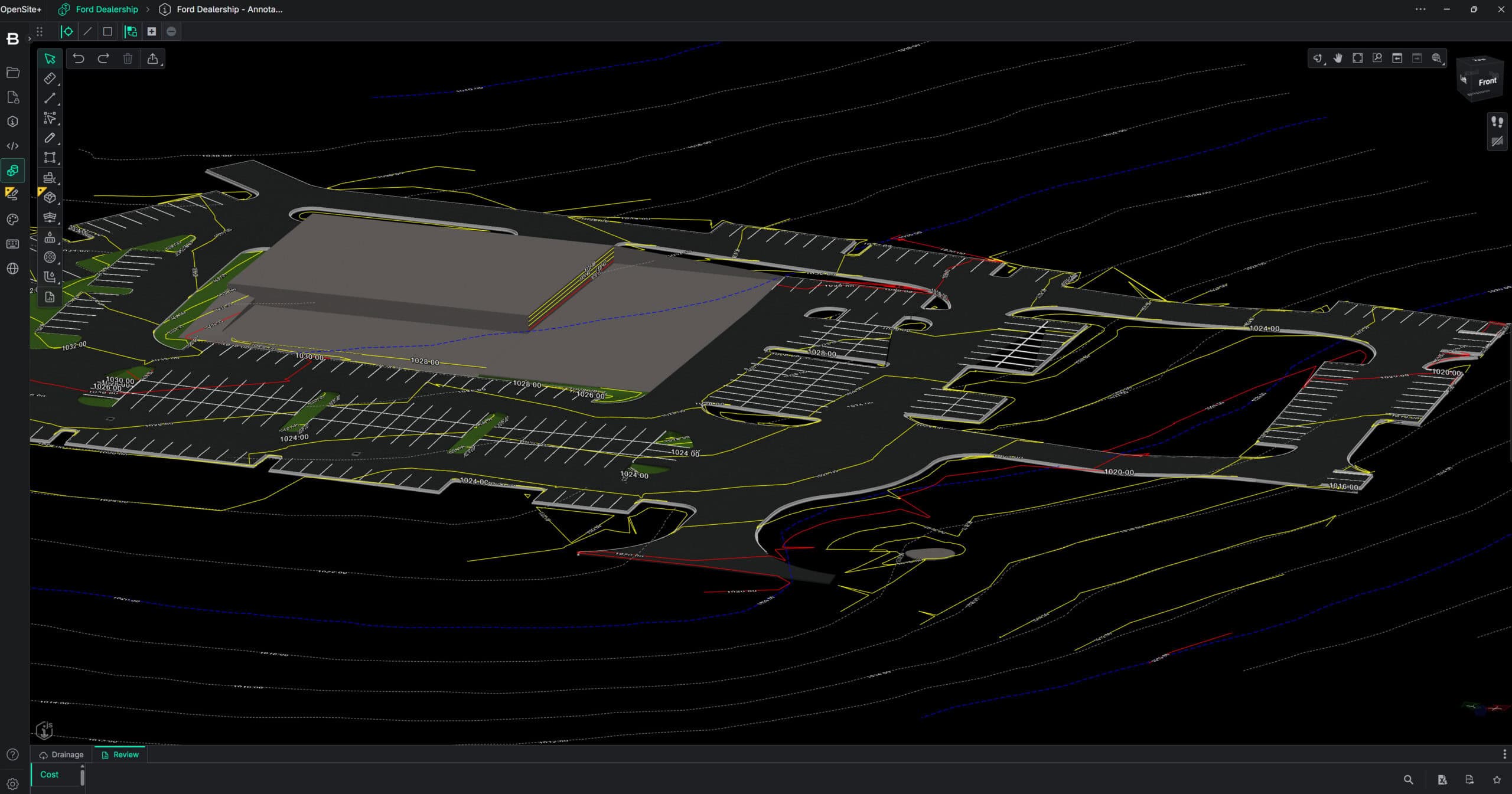
Infrastructure professionals across transportation, energy, water, and cities need modern CAD software to design, model, and deliver projects faster, smarter, and with greater context. Meeting these demands requires smarter, more connected ways of thinking about design, data, and delivery. With MicroStation 2026, Bentley introduces new features and enhancements that address modern productivity gaps by combining 3D geospatial visualization, automation, and efficiency.
When infrastructure is designed with outdated assumptions, fragmented data, or limited real‑world insight, the consequences are costly and long‑lasting. Cost overruns, construction delays, safety risks, and underperforming assets don’t just affect projects—they impact communities through service disruptions, reduced climate resilience, higher lifecycle costs, and erosion of public trust. For engineers, owners, and operators, the cost of poor decisions is not only technical, but economic and reputational. With MicroStation’s intelligent design tools, teams can make better decisions from the start. These design decisions shape the resilience, sustainability, and performance across the entire infrastructure lifecycle—directly influencing quality of life for the communities it serves.
MicroStation 2026 is built for this reality. It combines intelligent automation, immersive 3D geospatial context, and performance enhancements to help infrastructure professionals design, model, and manage complex systems with greater confidence and speed. MicroStation remains the only CAD software purpose-built for infrastructure—providing the foundation for accurate designs, trusted delivery, and long-term asset performance. These capabilities work together to support greater efficiency, richer context and reliable delivery across infrastructure projects.
Key MicroStation 2026 capabilities:
- Python Assistant (Technology Preview)
- Bentley Copilot (Technology Preview)
- Geographic Coordinate System (GCS) Dialog improvements
- Search Location tool
- 3D Geospatial Context dialog (Technology Preview)
- Configurations Wizard
- Component Center 2.0
- Updated SpaceMouse integration
Smarter Infrastructure Design
Empowering Automation with Python Assistant
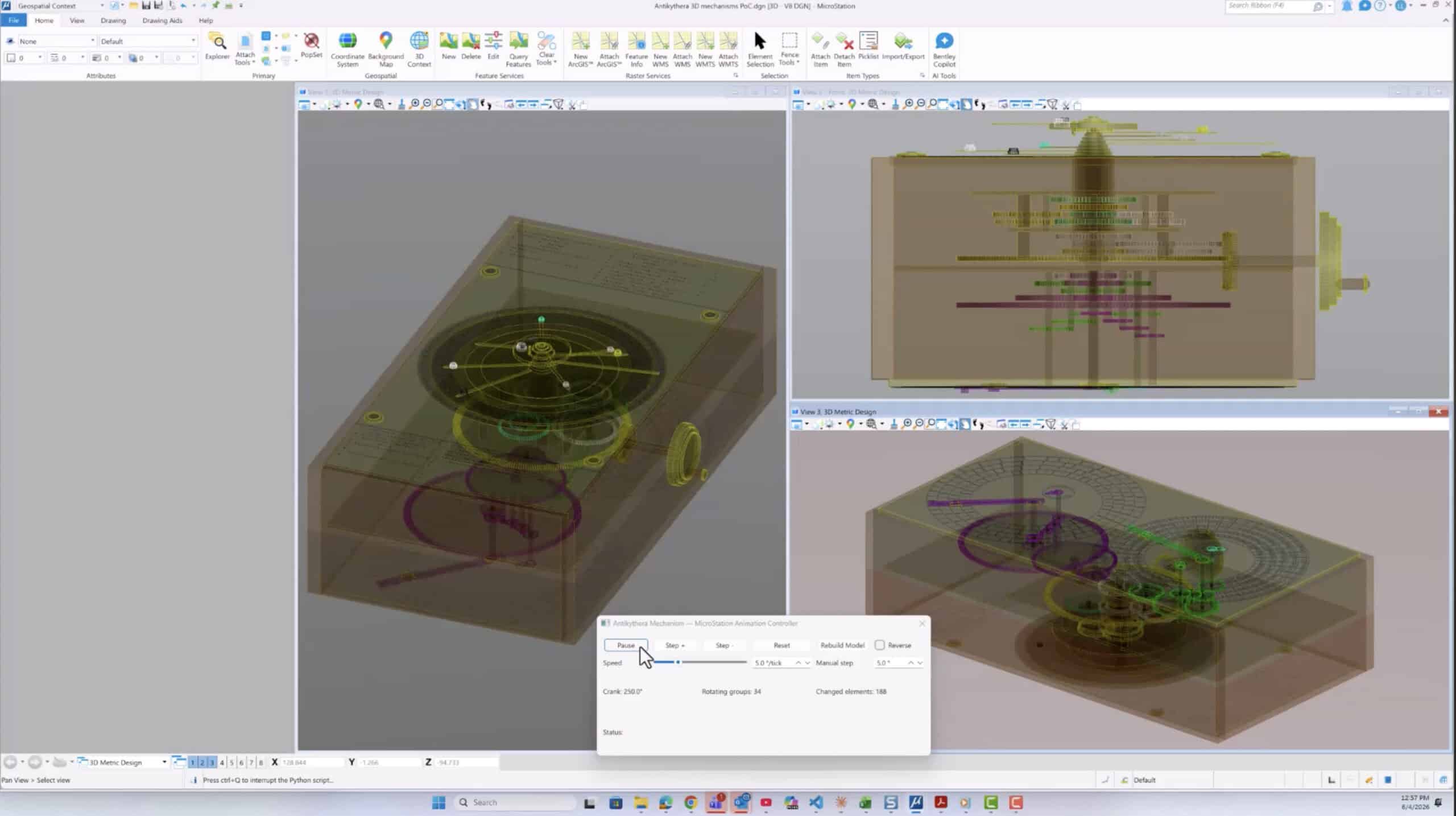
Python Assistant (Technology Preview) brings AI capabilities into execution and customization. Python has long enabled powerful automation in MicroStation, but Python Assistant lowers the barrier to success for both beginners and experienced developers.
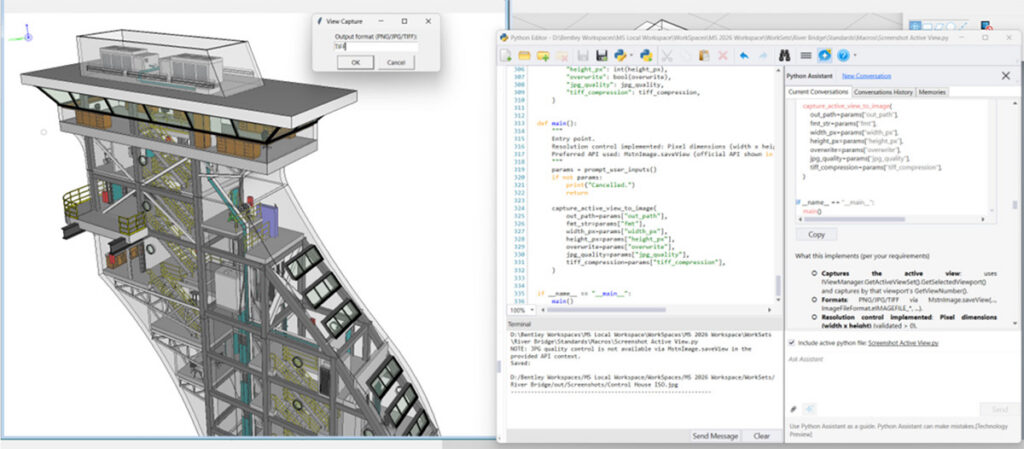
Automation made accessible. With built in scripting tools and AI-assisted guidance, users can generate, explain, edit, and reuse Python scripts—automating tasks such as batch file updates, report generation, or repetitive model edits. For example, a CAD manager can create a script to apply project standards across hundreds of legacy files; that same script can then be reused by the entire team, saving hours on every project.
Predictable delivery at scale. In an environment where engineering demand outpaces available talent, Python-driven automation becomes essential. By automating high-volume, repetitive tasks, teams can redirect scarce engineering hours to higher value design and decision making work. By standardizing repeatable tasks across projects, Python Assistant reduces workflow variability—supporting more predictable schedules, consistent outputs, and fewer last minute surprises during delivery.
Clear business impact. Automation reduces manual effort, improves consistency, and directly supports profitability by freeing teams to focus on higher value design work. Custom tools help organizations differentiate their delivery capabilities, while shared automations improve retention by empowering teams with efficient, purpose-built workflows.
Bentley Copilot: learning, help, and onboarding (Technology Preview)
This release introduces a technology preview of Bentley Copilot—an embedded assistant and a first step in our journey to enhance MicroStation productivity through AI. In this phase, Copilot aims to help users learn and work through a simple model: Ask. Learn. Accelerate.
- Aims for Contextual Guidance: Instead of searching menus or PDFs, users can ask questions in plain language directly inside their design environment. Whether translating an AutoCAD concept like an XREF or mastering a new workflow, Copilot is designed to provide step-by-step guidance when needed.
- Reducing Onboarding Friction: We are developing Copilot to help new hires—especially those transitioning from AutoCAD—ramp up faster. By adapting responses to a user’s background, it intends to reduce day-one friction without slowing down experienced users.
- Focus on Continuous Improvement: Copilot is designed to explain the “how” and “why” behind tasks, helping to reinforce best practices and organization standards over time.
- Secure Knowledge: Our goal is to allow teams to securely reference local standards and training materials, turning static documentation into active guidance without data leaving the user’s environment.
Note: As a Technology Preview, we are actively refining Bentley Copilot’s intelligence. We encourage you to explore its capabilities and share your feedback to help us shape AI in MicroStation.
Immersive 3D Geospatial Context for Real World Design
Infrastructure projects deliver the greatest value when designs are grounded in the real world. Alignment issues, poor context, or late discovery of constraints can lead to rework, delays, and reduced stakeholder confidence. MicroStation 2026 introduces a clearer, more integrated approach to 3D geospatial context, bringing accurate positioning, global datasets, and immersive visualization together into a single, repeatable workflow. Rather than treating geospatial features as separate tools, MicroStation 2026 enables users to follow a new, improved three‑step process: accurate placement, fast location, and immersive 3D context. The result is better understanding, better decisions, and better outcomes.
Step 1: Set the Geographic Coordinate System with confidence

Every geospatial workflow depends on accurate positioning. MicroStation 2026 Geographic Coordinate System (GCS) Dialog improvements make selecting the correct system faster and more reliable. A new map view validates the extent of the selected coordinate system, key properties are available in one place, and deprecated options are hidden to reduce errors. These usability improvements help users confidently confirm that the chosen GCS fits their project area—critical when coordinating designs with survey, GIS, terrain, and other geographically located data. Accurate geolocation at this stage is essential for successful data alignment and downstream workflows such as digital twin creation.
Step 2: Locate the project instantly with Search Location
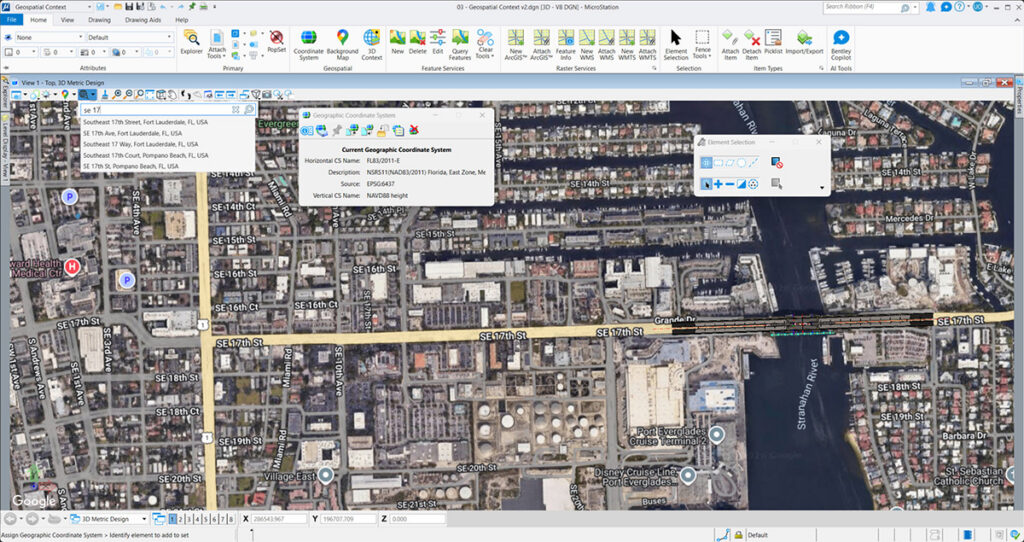
Once the coordinate system is set, MicroStation 2026 removes the friction traditionally associated with geolocation. The new Search Location tool, powered by Google services, enables users to search by address and automatically fit the view—much like using Google Maps. Instead of entering coordinates manually or referencing external tools, users can locate projects in seconds. This dramatically speeds up project setup while reducing the risk of positioning errors. For infrastructure designers working on location‑sensitive projects, this familiar, map‑based experience improves usability and aligns MicroStation with modern expectations. By simplifying how projects are positioned in the real world, Search Location ensures that users reach accurate context faster, so they can spend more time designing and less time preparing.
Step 3: Activate immersive 3D Geospatial Context
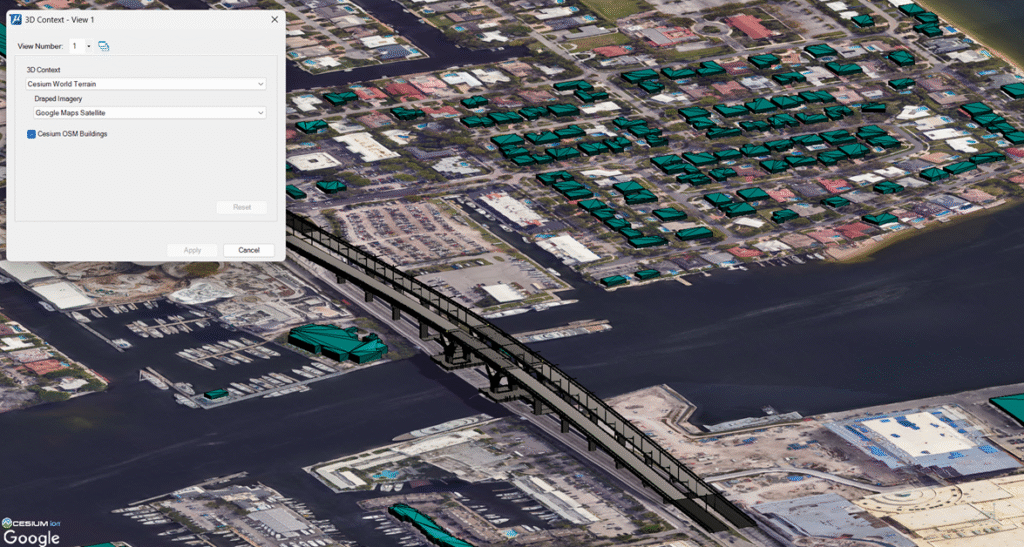
With the project accurately located, users can now bring design and reality together using the new 3D Geospatial Context Dialog (Technology Preview)—the central access point for streaming, high‑quality 3D geospatial data in MicroStation. Through this dialog, users can activate curated global datasets, including Cesium World Terrain for high‑resolution global terrain, Cesium OSM Buildings for a worldwide set of over 350 million buildings, and Google Photorealistic 3D Tiles for richly textured, real‑world environments. These datasets stream efficiently as 3D Tiles, an open OGC Community Standard optimized for performance, interactivity, and scale. This creates an immediate immersive experience, allowing users to see their designs in realistic context—surrounded by terrain, buildings, and urban landscapes. Designers can better evaluate visual impact, understand constraints, validate assumptions, and communicate intent to stakeholders with clarity. Because MicroStation 2026 supports 3D Tiles natively, users benefit from efficient streaming of massive datasets, real‑time interaction, and broad interoperability with other software that reads and writes the same open standard. This openness strengthens Bentley’s Cesium integration and delivers powerful 3D geospatial context without locking users into proprietary workflows.
Together, these three steps establish a clear and repeatable approach to applying real‑world 3D context in infrastructure design—ensuring accurate placement, faster setup, and seamless access to global datasets within MicroStation.
Performance & Other Enhancements in MicroStation 2026
MicroStation 2026 delivers meaningful performance and usability enhancements that improve everyday work from the moment users launch the application. These updates focus on three practical areas that directly affect productivity at scale: simplifying setup, improving component reuse and governance, and accelerating navigation in complex 3D models.
Configurations Wizard for faster setup with less friction
Getting started with CAD software often means wrestling with configurations—standards, resource paths, and environment settings that traditionally require scripting expertise and careful manual setup. The new Configurations Wizard replaces that complexity with an intuitive, guided setup experience built directly into MicroStation.
Using a UI driven workflow and best practice templates, the Configurations Wizard enables users to create a working configuration quickly, with no scripting required for initial setup. Instead of editing configuration files manually or writing .cfg‑based scripts, users complete the entire setup through a user interface. This makes configuration creation accessible to a much broader audience, from small and midsized businesses adopting MicroStation for the first time to larger organizations that want to simplify or reset overly complex environments.
The value is immediate. Teams reduce setup time, eliminate common configuration errors, and establish more consistent standards across projects. CAD managers can create reusable configurations based on proven practices, while individual users can get productive faster without deep technical knowledge.
Many CAD software products still rely on script heavy, manually maintained configuration files, making setup difficult to standardize and risky to change once projects are underway. What appears simple at first often becomes fragile at scale, where minor configuration errors can ripple across teams and projects. In contrast, MicroStation 2026 simplifies configuration setup, helping organizations avoid the hidden costs that arise from inconsistent environments and ad hoc setup practices.
Smarter catalog management and governance for infrastructure teams
Consistency and reuse are essential for efficient infrastructure delivery, especially in distributed teams. Component Center 2.0 is a renewed, cloud-based library for managing and reusing design components, with deeper integration into MicroStation and Bentley Infrastructure Cloud.
Component Center 2.0 enables organizations to manage approved design content—geometry, data, reference files, and links—in a single, connected environment. Administrators can create custom catalogs from enterprise libraries to ensure designers always use the right components. Designers, in turn, can place those components directly within MicroStation, confident that they comply with organizational standards.
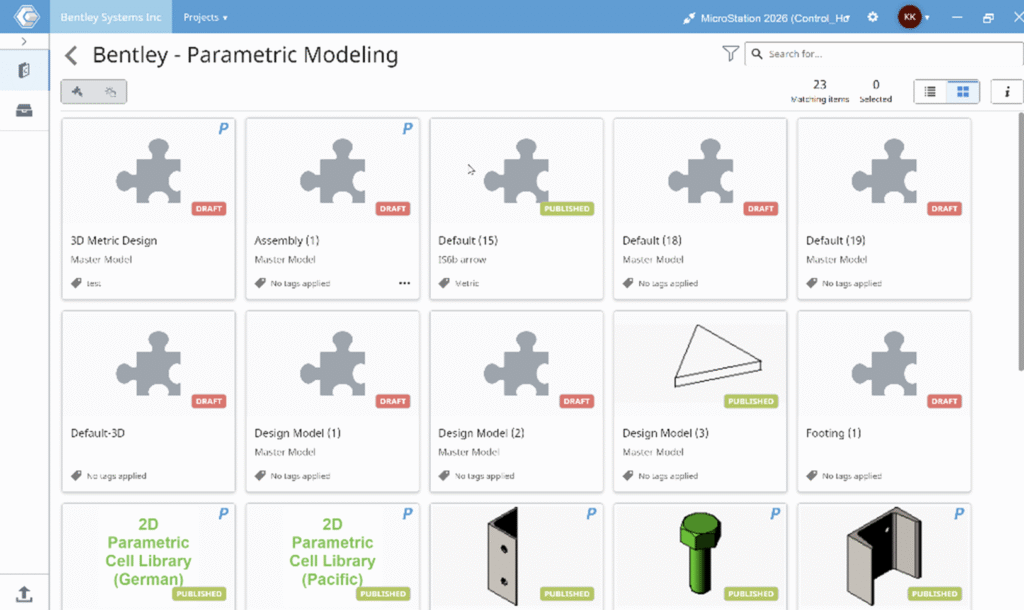
What sets Component Center 2.0 apart is its readiness for digital delivery. It is iTwin friendly, enabling components to be connected and traceable from design through construction and into operations. Changes are tracked, governance is enforced, and information such as cost, installation details, and maintenance data remains accessible throughout the asset lifecycle. For owners and operators, this continuity reduces errors and saves time long after design is complete.
With smarter catalog management and governance, a fresh and consistent UI across design apps, and seamless enterprise integration, Component Center 2.0 helps teams scale collaboration while maintaining control and security.
Updated SpaceMouse integration brings smoother performance for complex models
For many professionals working in large, detailed 3D models, navigation performance directly impacts productivity. MicroStation 2026 introduces an updated SpaceMouse integration through a partnership with 3Dconnexion, using the latest Navigation Library.

The updated integration results in a significant performance improvement for large models, delivering smoother, faster, and more responsive navigation. Users benefit from intuitive navigation modes such as Fly, Walk, Object, and Drone, along with SmartUI support for command export and custom button mapping. Certified compatibility with all current and future SpaceMouse devices ensures a future proof experience aligned with modern 3D input standards.
Together, these performance and enhancement updates reinforce MicroStation 2026 as a production ready software—one that reduces setup overhead, improves consistency at scale, and lets professionals move confidently through even the most complex infrastructure models.
Design Infrastructure with Confidence Using MicroStation 2026
Modern infrastructure delivery depends on reducing time to productivity and minimizing execution risk. MicroStation 2026 helps organizations save time across teams and execute projects more predictably by combining automation, immersive 3D geospatial context, and production ready performance. Teams spend less time configuring environments, searching for answers, and correcting errors—and more time delivering accurate designs on schedule. Purpose built for infrastructure workflows, MicroStation 2026 supports consistent outcomes across projects and disciplines. As part of Bentley’s mission to advance resilient, sustainable infrastructure, MicroStation 2026 supports infrastructure professionals across the full project lifecycle—from design through delivery and beyond.
As the global demand for resilient infrastructure grows faster than the supply of skilled engineers, MicroStation 2026 helps organizations close this capacity gap. By augmenting engineering expertise with AI driven automation and immersive context, MicroStation enables teams to deliver more—without compromising quality or requiring proportionally larger teams.
Ready to experience trusted CAD software built for infrastructure? Learn more about MicroStation 2026 and how it helps teams deliver faster, with confidence.